 扫码关注
扫码关注






 1 理论
1 理论
基本概念
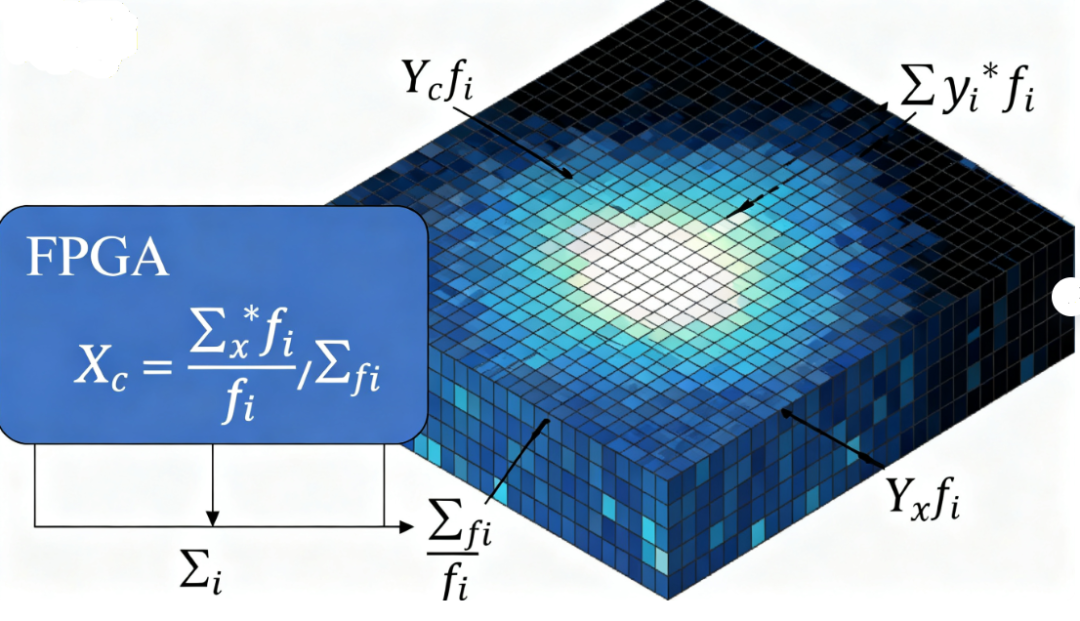
灰度质心法(Gray-scale Centroid Method)是一种基于图像灰度分布的加权平均位置计算方法。它将图像的灰度值作为质量权重,计算图像的"质量中心"。
数学原理
 1. 离散图像的计算公式
对于离散的数字图像,灰度质心的计算公式为: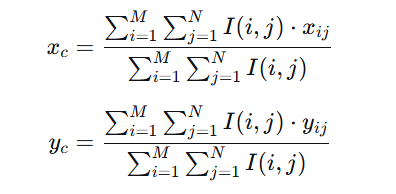
其中:
 2. 连续情况下的推广
对于连续图像,公式可写为: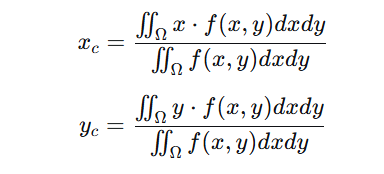
其中 f(x,y)是图像的灰度分布函数。
物理意义
类比物理学中的质心概念
2 matlab 实现灰度质心法 % 读取图像并转换为灰度图
I = imread('your_image.jpg');
if size(I, 3)==3
I = rgb2gray(I);
end
% 将图像数据转换为double类型
I = double(I);
% 获取图像尺寸
[rows, cols]= size(I);
% 创建坐标网格
[x, y]= meshgrid(1:cols, 1:rows);
% 计算总灰度值
total_intensity = sum(I(:));
% 计算灰度质心坐标
centroid_x = sum(sum(I .* x)) / total_intensity;
centroid_y = sum(sum(I .* y)) / total_intensity;
% 显示结果
fprintf('灰度质心坐标: (%.2f, %.2f)', centroid_x, centroid_y);
% 可视化显示
figure;
imshow(uint8(I));
hold on;
plot(centroid_x, centroid_y, 'r ', 'MarkerSize', 15, 'LineWidth', 2);
title('图像灰度质心'); 3 FPGA 实现灰度质心法求取质心
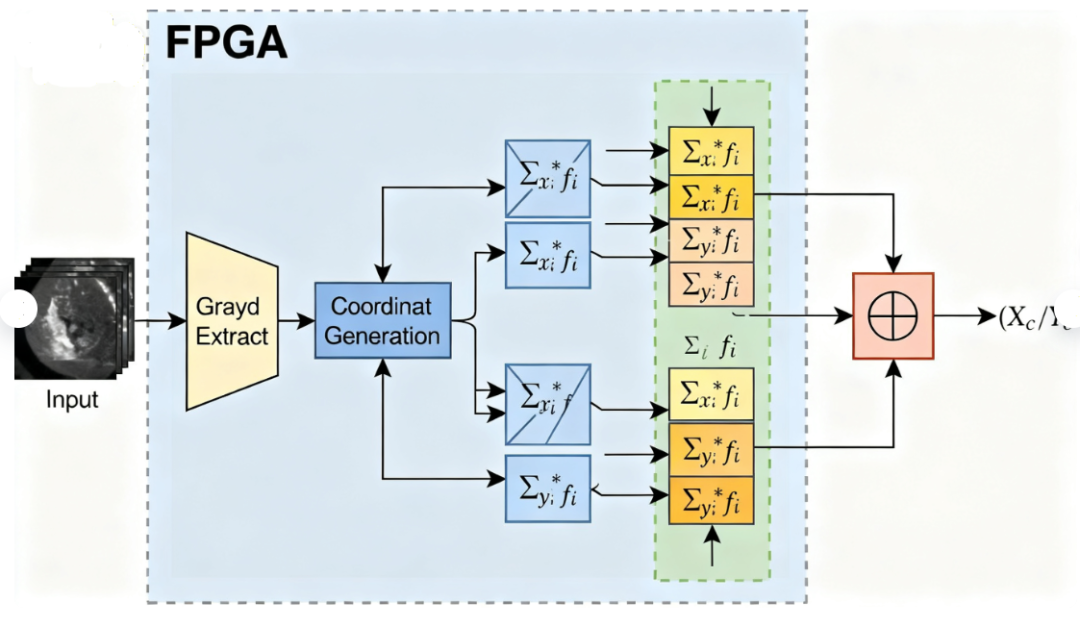
`timescale 1ns/1psmodule totalmass( input pixelclk, input reset_n, input [11:0] hcount, input [11:0] vcount, input [7:0] i_gray, input i_hsync, input i_vsync, input i_de, output reg [31:0] centerx, output reg [31:0] centery, output reg out_flag );parameter IDLE =2'd0, TOTAL=2'd1, CALC =2'd2, OUT =2'd3;reg [31:0] totalgray;reg [31:0] totalcenterx;reg [31:0] totalcentery;reg [1:0] state;always @(posedge pixelclk or negedge reset_n) begin if(!reset_n) begin totalgray <=<> 32'd0;
centerx<= 32=""> centery<=<> 32'd0;
out_flag <= 1=""> totalcenterx<=<> 32'd0;
totalcentery<= 32=""> state<=<>IDLE;
end else begin case(state) IDLE:begin if(i_vsync==1'b1) begin state <= total=""> end else begin totalgray <= 32=""> totalcenterx<=<> 32'd0;
totalcentery<= 32=""> end end TOTAL:begin if(i_vsync==1'b0) begin state <= calc=""> end else if(i_de==1'b1) begin totalgray <=<> totalgray i_gray;
totalcenterx <=<> totalcenterx hcount*i_gray;
totalcentery <=<> totalcentery vcount*i_gray;
end end CALC:begin if(totalgray!=0) begin centerx <=<> totalcenterx/totalgray;
centery <=<> totalcentery/totalgray;
out_flag <=<> 1'b1;
state <= out=""> end else begin out_flag <= 1=""> state <=<> IDLE;
end end OUT:begin out_flag <=<> 1'b0;
state <= idle=""> end endcase end endendmodule